
Supported review platforms
Google Business Profile reviews. If you monitor a physical location, you can also paste a Google Maps URL or Place ID into Add keyword. This works the same way as the platforms above but is not listed in the platform picker, because location reviews are noise for most software companies.
Connect a review page
1
Open the keyword
Go to the Keywords page, find the brand or competitor keyword you want reviews for, and click Edit.
2
Pick the review platform
Open the Platforms dropdown and scroll to the bottom. Trustpilot, App Store, and Google Play are listed below the regular platforms. Click Connect page.
3
Paste the page URL
Paste the review page URL. For App Store and Google Play, also pick the countries whose storefronts you want to monitor and the review language.
4
Connect
Click Connect page. The connection is saved immediately, independently of the other keyword settings. You do not need to save the keyword sheet afterwards.
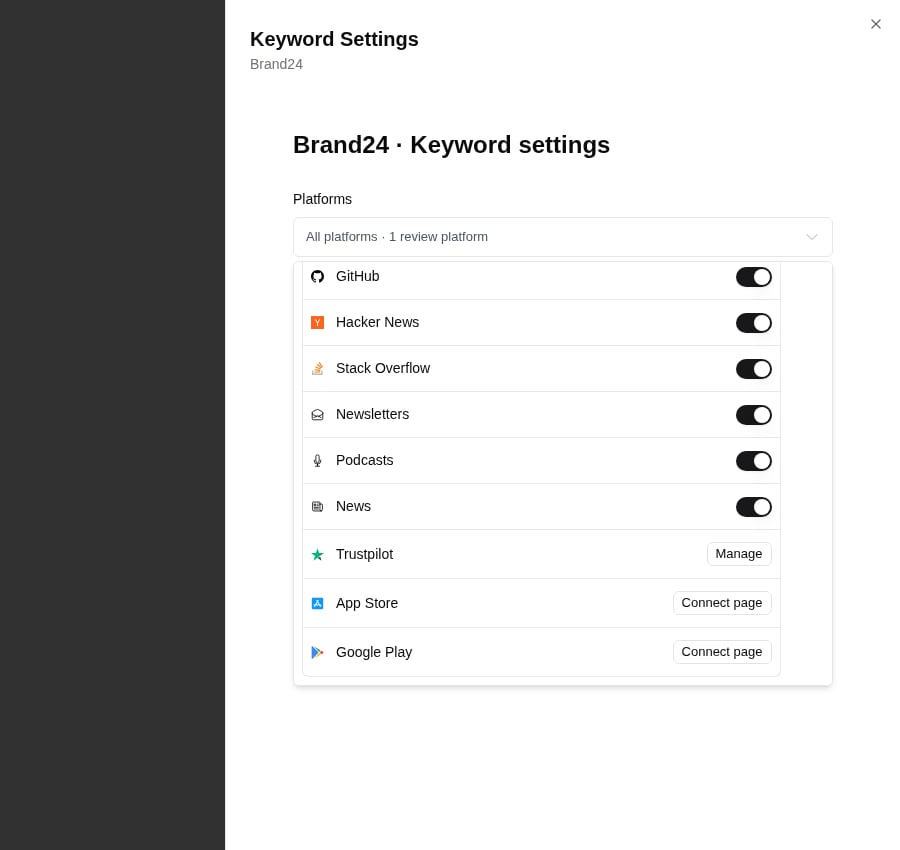
Review platforms sit at the bottom of the Platforms dropdown in Keyword Settings.
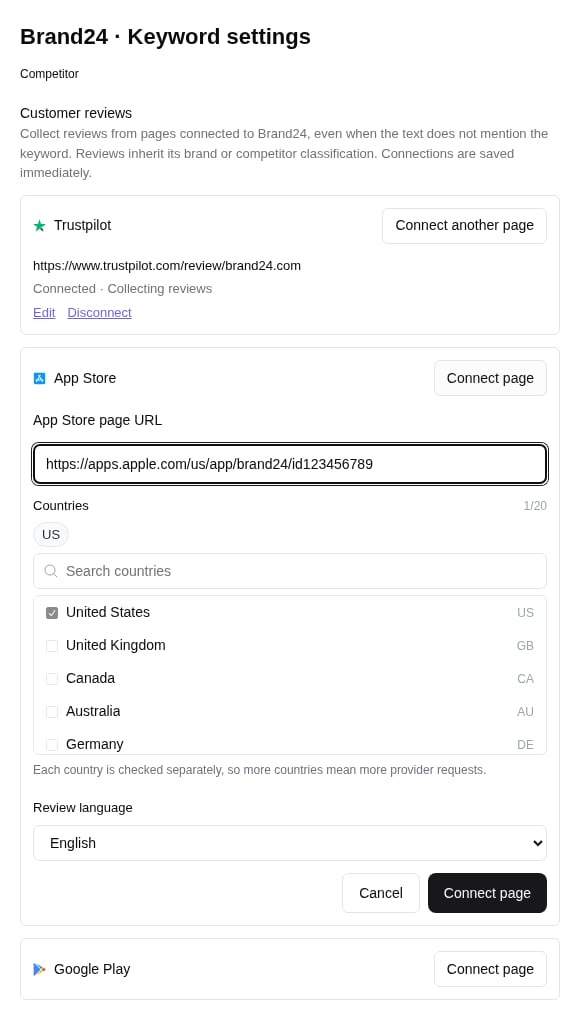
Connecting an App Store page: paste the URL, pick countries, and choose the review language.
- Settings → Platforms. The review platforms are listed at the bottom of the platform list. Click Add next to one, paste the URL, and choose which keyword to connect it to.
- Add keyword. Paste a review page URL into the keyword input on the Keywords page. Octolens recognizes it and asks which existing keyword the page belongs to.
Countries and languages for app stores
App Store and Google Play reviews are stored per country storefront. A US-only connection for an app that is reviewed mostly in Germany collects almost nothing, so pick every country where your app has real users. Each connection supports up to 20 countries. Every country is checked separately, so more countries mean more provider requests but no extra mentions unless there are new reviews.How reviews are collected
- Once a day. Every connected page is checked daily. Admins can trigger Sync now from the connection’s Manage panel, with a 15-minute cooldown.
- One year of history. When you connect a page, Octolens imports reviews from the last 12 months. This initial import is free, does not count toward your mention limit, and does not trigger alerts. The reviews are visible in your feeds right away.
- New reviews count once. After the initial import, every new review is one mention and counts toward your monthly quota like any other post. Edits to a review, owner or developer replies, re-checks, and the same review appearing in several countries do not count again.
- Pauses at your mention limit. When the workspace hits its monthly mention limit, review collection pauses along with everything else until the limit resets or you turn on Flex mentions. See Mention Limits.
What a review looks like in Octolens
Reviews appear in your feeds as regular mentions with the review platform’s icon, plus a few extra details:- Star rating and scale, shown on the card, in Slack notifications, and in the API.
- Verified badge when the platform marks the review as verified.
- Owner or developer response and the time it was posted, when there is one.
- Connected page name, so you can tell which listing or country the review came from.
The mention date is the date the review was published, not the date Octolens found it. A feed filtered to “Last 7 days” shows reviews written in the last 7 days, so the initial one-year import does not flood short date windows.
Filter and route reviews
In Feeds, reviews show up with the rest of the keyword’s mentions. To work with them separately:- Filter by Platform and pick Trustpilot, App Store, or Google Play. The review platforms only appear in the filter once at least one page is connected.
- Add a Review rating filter to keep only certain star ratings, for example 1 and 2 stars for a “negative reviews” feed.
trustpilot_reviews, app_store_reviews, google_play_reviews, and google_reviews, and reviewRating is available as a filter everywhere the source filter is.
Manage or disconnect a page
Open the keyword’s Platforms dropdown and click Manage next to a connected review platform, or go to Settings → Platforms, which lists every connected page with its keyword.- Edit changes the page’s display name, countries, or review language. It does not rename the keyword.
- Retry restarts collection when the status shows that the page needs attention.
- Disconnect stops collecting from that page. Reviews already collected stay under the keyword. Reconnecting the same page to the same keyword later restores collection without duplicating history.
Only workspace admins can connect, edit, or disconnect review pages.