
Analysis & reporting
1. Custom analytics and graphs
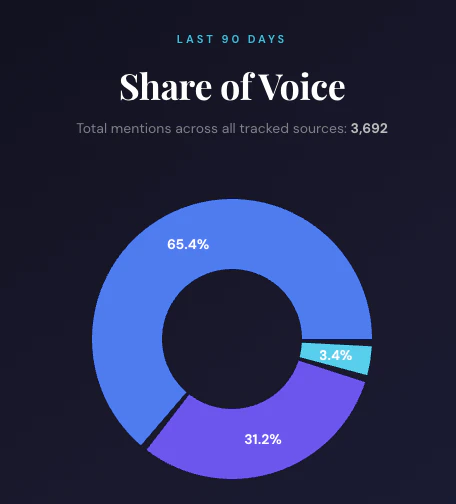
Prompt: “Using Octolens, calculate the share of voice for BRAND vs. COMPETITOR1 and COMPETITOR2 over the last 90 days. Return a pie chart with brand, total mentions, and percentage share of total mentions.” What this does:- Runs an aggregate query across your brand and competitor mentions
- Creates a custom graph
2. Weekly reputation monitoring
Prompt: “Show me all mentions from the last 7 days, grouped by sentiment. Highlight any negative mentions that need immediate response.” Best for: Weekly stand-ups, team reviews3. Competitive intelligence
Prompt: “Compare how people talk about [Your Brand] vs [Competitor] on Reddit this month. What are the key differentiators?” Best for: Product marketing, positioning strategy4. Product feedback analysis
Prompt: “Extract all feature requests mentioned on any platform in the last month. Group by frequency and urgency.” Best for: Product teams, roadmap planning5. Campaign performance
Prompt: “Show me all mentions during our launch week (Feb 1–7). How did sentiment change day by day?” Best for: Marketing teams, launch retrospectivesManaging keywords
Your assistant can also adjust what you monitor.6. Add a keyword
Prompt: “Add ‘next.js deployment’ as a new keyword. Just monitor Reddit and Hacker News.” What this does:- Creates the keyword and AI-fills its context and exclusions from your company profile
- Surfaces the inferred settings so you can refine them
7. Review AI suggestions
Prompt: “Show me the pending keyword suggestions. Accept the competitor ones and reject the rest.” What this does:- Lists AI-proposed keyword tweaks awaiting review
- Applies your decisions in one pass
8. Clean up monitoring
Prompt: “Pause the keyword for our old product name, and tell me how many keywords I have left on my plan.”Feeds & notifications
9. Build a routed feed
Prompt: “Create a ‘Buy intent on Reddit’ feed that filters for Reddit posts tagged buy_intent, and send a daily 9am digest to #leads in Slack.” What this does:- Creates the saved filter
- Resolves the Slack channel and wires up a daily destination
10. Add a webhook
Prompt: “Add a webhook destination to my Competitor Activity feed pointing at https://example.com/hook so I get every matching mention in real time.”Prompting tips
Be specific about time ranges- “Last 7 days” is better than “recently”
- “January 2026” is better than “this month”
- “Reddit and Hacker News” vs. “all platforms” helps the assistant focus
- “Group by sentiment”, “Summarize in bullet points”, “Return a table”
- For keyword and feed changes, ask the assistant to show you the proposed settings before applying. It surfaces AI-filled values so you can refine them.