> ## Documentation Index
> Fetch the complete documentation index at: https://octolens.com/docs/llms.txt
> Use this file to discover all available pages before exploring further.
# Use Cases
> Real prompts and workflows for the Octolens MCP v2 server. Turn brand mentions into briefs, lead lists, and competitive intelligence — and manage keywords and feeds without leaving your AI assistant.
v2 covers everything from analytics to managing your monitoring setup. The prompts below are grouped by what they touch.
***
## Analysis & reporting
#### 1. Custom analytics and graphs
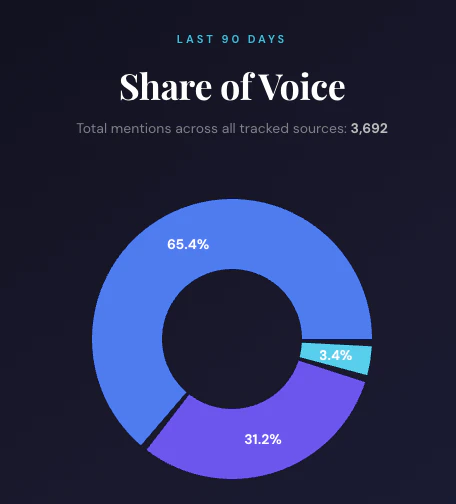
**Prompt:** "Using Octolens, calculate the share of voice for BRAND vs. COMPETITOR1 and COMPETITOR2 over the last 90 days. Return a pie chart with brand, total mentions, and percentage share of total mentions."
**What this does:**
* Runs an aggregate query across your brand and competitor mentions
* Creates a custom graph
For heavier analytics and graph generation, use a stronger reasoning model rather than a lightweight chat model.
 #### 2. Weekly reputation monitoring
**Prompt:** "Show me all mentions from the last 7 days, grouped by sentiment. Highlight any negative mentions that need immediate response."
**Best for:** Weekly stand-ups, team reviews
#### 3. Competitive intelligence
**Prompt:** "Compare how people talk about \[Your Brand] vs \[Competitor] on Reddit this month. What are the key differentiators?"
**Best for:** Product marketing, positioning strategy
#### 4. Product feedback analysis
**Prompt:** "Extract all feature requests mentioned on any platform in the last month. Group by frequency and urgency."
**Best for:** Product teams, roadmap planning
#### 5. Campaign performance
**Prompt:** "Show me all mentions during our launch week (Feb 1–7). How did sentiment change day by day?"
**Best for:** Marketing teams, launch retrospectives
***
## Managing keywords
New in v2 — your assistant can adjust what you monitor.
#### 6. Add a keyword
**Prompt:** "Add 'next.js deployment' as a new keyword. Just monitor Reddit and Hacker News."
**What this does:**
* Creates the keyword and AI-fills its context and exclusions from your company profile
* Surfaces the inferred settings so you can refine them
#### 7. Review AI suggestions
**Prompt:** "Show me the pending keyword suggestions. Accept the competitor ones and reject the rest."
**What this does:**
* Lists AI-proposed keyword tweaks awaiting review
* Applies your decisions in one pass
#### 8. Clean up monitoring
**Prompt:** "Pause the keyword for our old product name, and tell me how many keywords I have left on my plan."
***
## Feeds & notifications
#### 9. Build a routed feed
**Prompt:** "Create a 'Buy intent on Reddit' feed that filters for Reddit posts tagged buy\_intent, and send a daily 9am digest to #leads in Slack."
**What this does:**
* Creates the saved filter
* Resolves the Slack channel and wires up a daily destination
#### 10. Add a webhook
**Prompt:** "Add a webhook destination to my Competitor Activity feed pointing at [https://example.com/hook](https://example.com/hook) so I get every matching mention in real time."
***
## Prompting tips
**Be specific about time ranges**
* "Last 7 days" is better than "recently"
* "January 2026" is better than "this month"
**Specify platforms when relevant**
* "Reddit and Hacker News" vs. "all platforms" helps the assistant focus
**Ask for structured outputs**
* "Group by sentiment", "Summarize in bullet points", "Return a table"
**Confirm before writes**
* For keyword and feed changes, ask the assistant to show you the proposed settings before applying — v2 surfaces AI-filled values so you can refine them.
#### 2. Weekly reputation monitoring
**Prompt:** "Show me all mentions from the last 7 days, grouped by sentiment. Highlight any negative mentions that need immediate response."
**Best for:** Weekly stand-ups, team reviews
#### 3. Competitive intelligence
**Prompt:** "Compare how people talk about \[Your Brand] vs \[Competitor] on Reddit this month. What are the key differentiators?"
**Best for:** Product marketing, positioning strategy
#### 4. Product feedback analysis
**Prompt:** "Extract all feature requests mentioned on any platform in the last month. Group by frequency and urgency."
**Best for:** Product teams, roadmap planning
#### 5. Campaign performance
**Prompt:** "Show me all mentions during our launch week (Feb 1–7). How did sentiment change day by day?"
**Best for:** Marketing teams, launch retrospectives
***
## Managing keywords
New in v2 — your assistant can adjust what you monitor.
#### 6. Add a keyword
**Prompt:** "Add 'next.js deployment' as a new keyword. Just monitor Reddit and Hacker News."
**What this does:**
* Creates the keyword and AI-fills its context and exclusions from your company profile
* Surfaces the inferred settings so you can refine them
#### 7. Review AI suggestions
**Prompt:** "Show me the pending keyword suggestions. Accept the competitor ones and reject the rest."
**What this does:**
* Lists AI-proposed keyword tweaks awaiting review
* Applies your decisions in one pass
#### 8. Clean up monitoring
**Prompt:** "Pause the keyword for our old product name, and tell me how many keywords I have left on my plan."
***
## Feeds & notifications
#### 9. Build a routed feed
**Prompt:** "Create a 'Buy intent on Reddit' feed that filters for Reddit posts tagged buy\_intent, and send a daily 9am digest to #leads in Slack."
**What this does:**
* Creates the saved filter
* Resolves the Slack channel and wires up a daily destination
#### 10. Add a webhook
**Prompt:** "Add a webhook destination to my Competitor Activity feed pointing at [https://example.com/hook](https://example.com/hook) so I get every matching mention in real time."
***
## Prompting tips
**Be specific about time ranges**
* "Last 7 days" is better than "recently"
* "January 2026" is better than "this month"
**Specify platforms when relevant**
* "Reddit and Hacker News" vs. "all platforms" helps the assistant focus
**Ask for structured outputs**
* "Group by sentiment", "Summarize in bullet points", "Return a table"
**Confirm before writes**
* For keyword and feed changes, ask the assistant to show you the proposed settings before applying — v2 surfaces AI-filled values so you can refine them.