> ## Documentation Index
> Fetch the complete documentation index at: https://octolens.com/docs/llms.txt
> Use this file to discover all available pages before exploring further.
# Dashboard
> Mentions over time, plan and API/MCP usage, and a recent mentions feed — your morning glance at how the workspace is doing.
The Dashboard is the first page you land on when you open Octolens. It's designed for a 30-second morning check: how many mentions came in, how much of your plan you've used, what the AI is filtering, and what API or MCP traffic looks like.
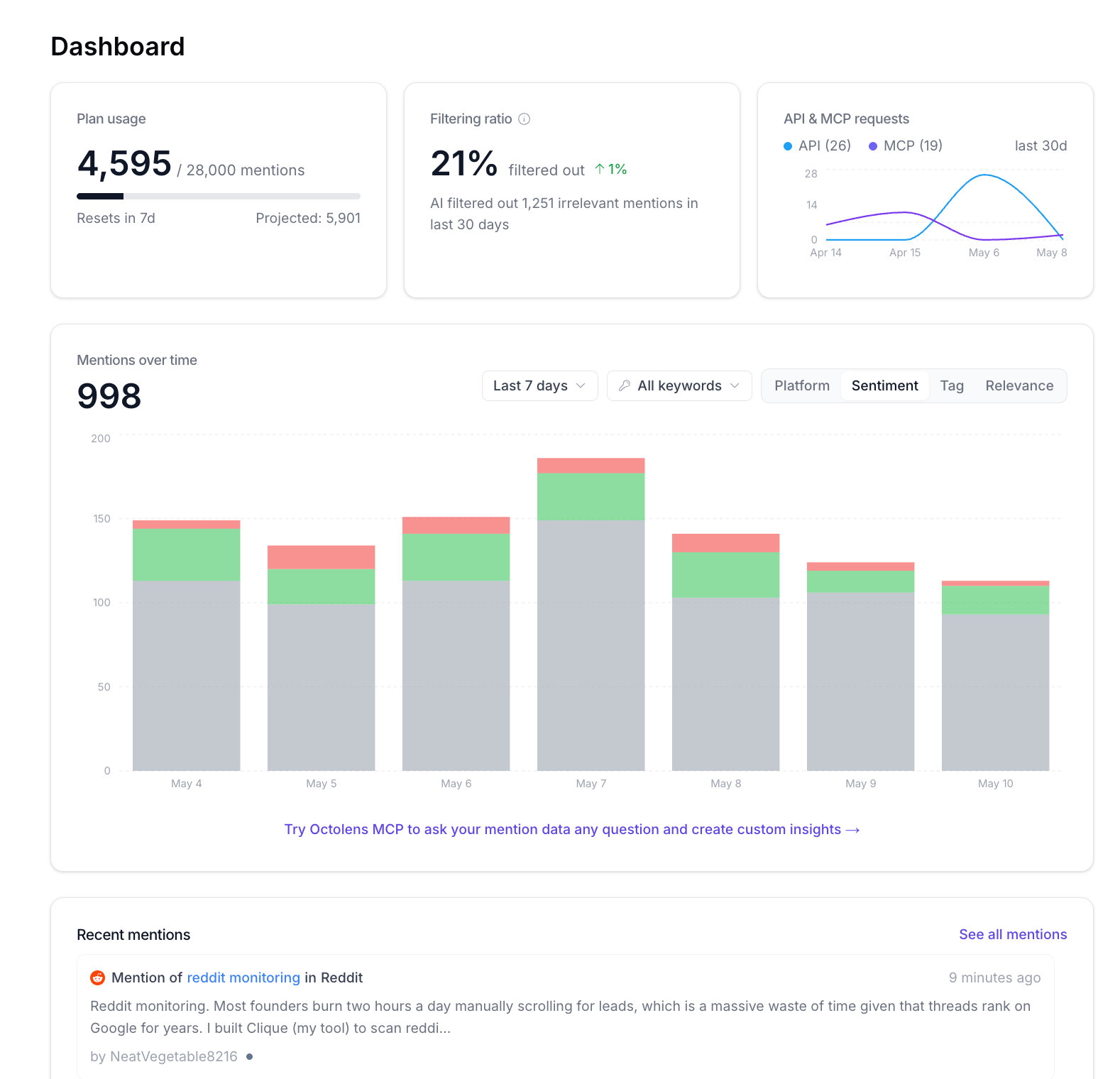 ## Top-level metric cards
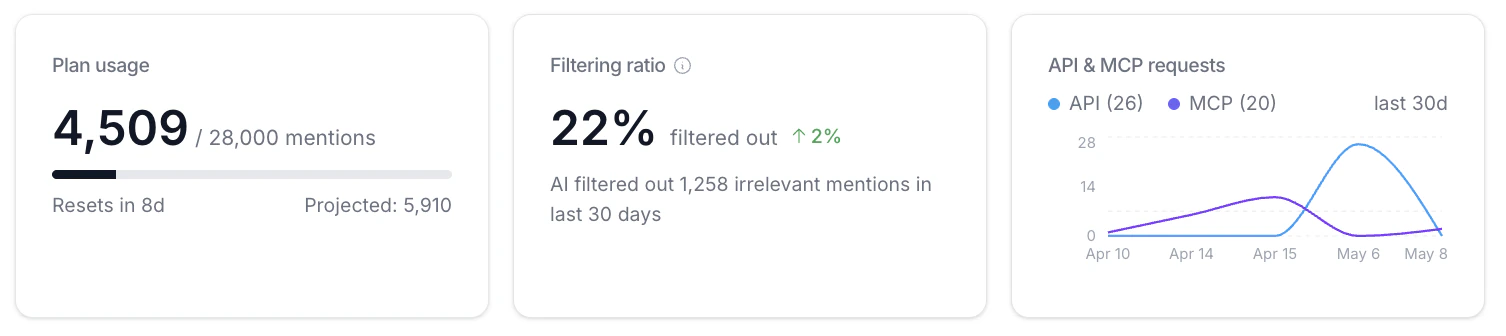 ### Plan usage
How many of your monthly mentions you've used out of your plan limit, plus a projected total for the cycle.
* **Used / total:** e.g. `4,509 / 28,000 mentions`
* **Resets in:** how many days until your billing cycle resets
* **Projected:** Octolens estimates where you'll land at the end of the cycle based on current intake. Watch this if you're worried about running out — see [Mention Limits](/learn/mention-limits) for how to bring usage down.
### Filtering ratio
The percentage of incoming mentions the AI filtered out as not relevant in the last 30 days, plus the week-over-week change.
A higher filtering ratio means the AI is doing more work for you. If your ratio is low and your feeds still feel noisy, your [company context](/quickstart/company-context) is the biggest lever to pull. See [AI Relevance & Tags](/learn/ai-relevance) for how relevance is decided.
### API & MCP requests
Counts of [API](/api/v2/overview) and [MCP](/mcp/overview) requests in the last 30 days, with a sparkline showing how usage has trended.
Useful for spotting changes in how your team or your agents are pulling mention data. If you've shipped a new automation or hooked up a new MCP client, you'll see the line move.
## Mentions over time
### Plan usage
How many of your monthly mentions you've used out of your plan limit, plus a projected total for the cycle.
* **Used / total:** e.g. `4,509 / 28,000 mentions`
* **Resets in:** how many days until your billing cycle resets
* **Projected:** Octolens estimates where you'll land at the end of the cycle based on current intake. Watch this if you're worried about running out — see [Mention Limits](/learn/mention-limits) for how to bring usage down.
### Filtering ratio
The percentage of incoming mentions the AI filtered out as not relevant in the last 30 days, plus the week-over-week change.
A higher filtering ratio means the AI is doing more work for you. If your ratio is low and your feeds still feel noisy, your [company context](/quickstart/company-context) is the biggest lever to pull. See [AI Relevance & Tags](/learn/ai-relevance) for how relevance is decided.
### API & MCP requests
Counts of [API](/api/v2/overview) and [MCP](/mcp/overview) requests in the last 30 days, with a sparkline showing how usage has trended.
Useful for spotting changes in how your team or your agents are pulling mention data. If you've shipped a new automation or hooked up a new MCP client, you'll see the line move.
## Mentions over time
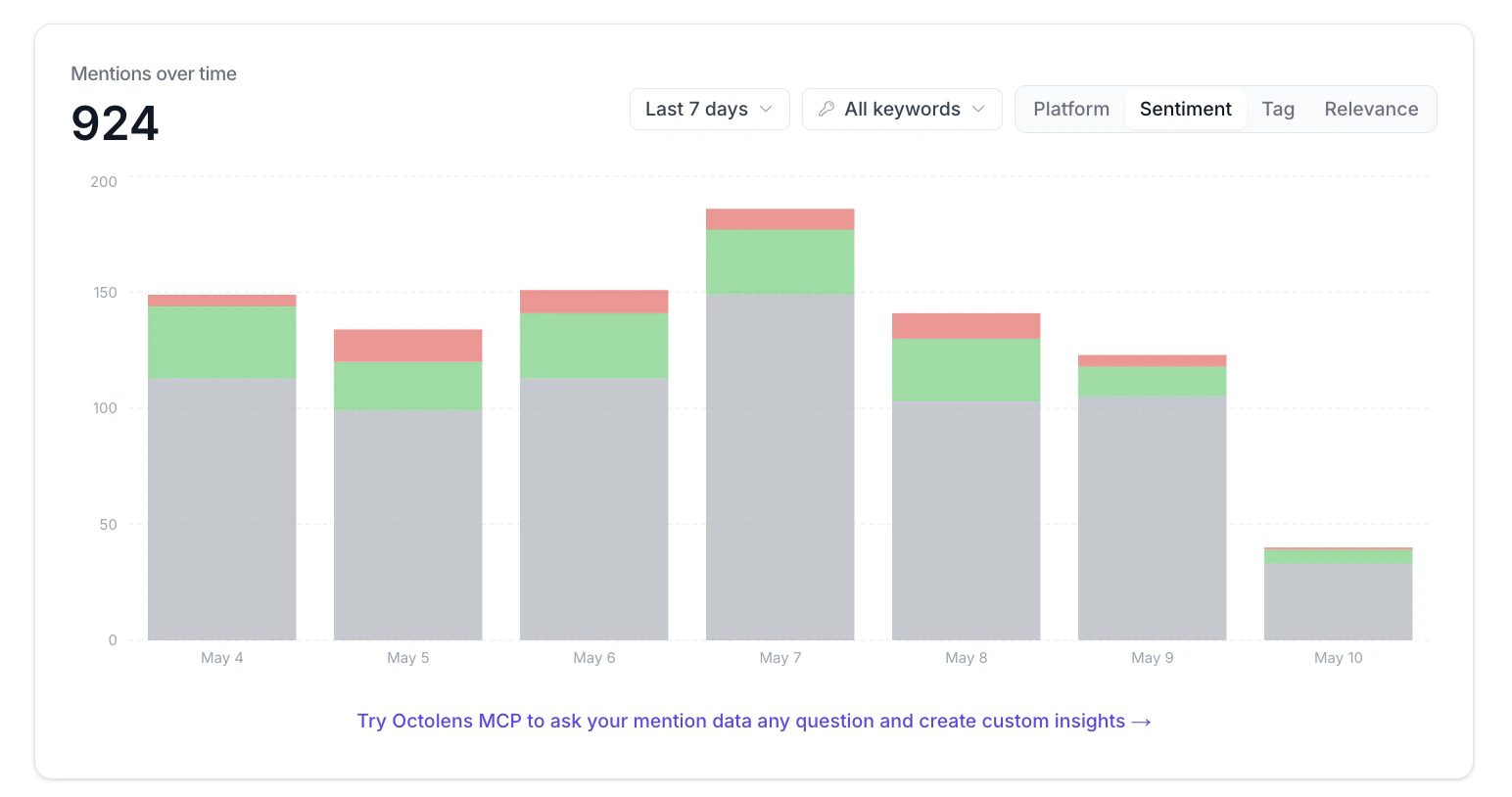 A stacked bar chart of total mentions per day. Use the controls in the top right to slice the chart:
* **Time range.** Last 7 days (default), Last 30 days, Last 90 days, Last 6 months, Last 1 year, or Custom.
* **Keywords.** Filter to one or more of your tracked keywords. Defaults to All keywords.
* **Breakdown.** Split each bar by **Platform**, **Sentiment**, **Tag**, or **Relevance**.
A few patterns worth pulling up:
* **By Sentiment.** Spot a rising negative slice early, before it shows up in support tickets.
* **By Platform.** See which platforms are driving conversation this week.
* **By Tag.** Look at the share of `Buy Intent` or `Bug Report` posts week over week.
* **By Relevance.** Compare filtered vs. relevant mentions to see how hard the AI is working.
The big number on the left is the total for the selected range and filters.
Below the chart, the **Try Octolens MCP** link drops you into the MCP playground. Anything you can see in this chart, you can ask the [MCP server](/mcp/overview) about in natural language: "Compare buy intent posts this week vs. last week, broken down by platform."
## Recent mentions
A short list of the latest mentions across all your keywords, with sentiment, tags, source platform, and the AI's one-line relevance comment. Click **See all mentions** to jump into the **For you** [feed](/quickstart/feeds), or click any mention to open the original post.
This panel is a quick pulse check, not a replacement for [Feeds](/quickstart/feeds). If you want to filter, sort, or send to a [destination](/quickstart/destinations), do it from a feed.
## Build your own analytics
For deeper analysis or custom dashboards, pull mention data programmatically:
* [MCP Server](/mcp/overview): ask Claude, ChatGPT, or Cursor about your mention data in natural language. Best for ad-hoc questions and one-off insights.
* [API Reference](/api/v2/overview): REST endpoints for programmatic access. Best for piping mentions into your own BI tool or warehouse.
## Next steps
* [Mention Limits](/learn/mention-limits): how to read the Plan usage card and bring usage down
* [AI Relevance & Tags](/learn/ai-relevance): what drives the Filtering ratio
* [Feeds](/quickstart/feeds): drill into specific subsets of mentions
A stacked bar chart of total mentions per day. Use the controls in the top right to slice the chart:
* **Time range.** Last 7 days (default), Last 30 days, Last 90 days, Last 6 months, Last 1 year, or Custom.
* **Keywords.** Filter to one or more of your tracked keywords. Defaults to All keywords.
* **Breakdown.** Split each bar by **Platform**, **Sentiment**, **Tag**, or **Relevance**.
A few patterns worth pulling up:
* **By Sentiment.** Spot a rising negative slice early, before it shows up in support tickets.
* **By Platform.** See which platforms are driving conversation this week.
* **By Tag.** Look at the share of `Buy Intent` or `Bug Report` posts week over week.
* **By Relevance.** Compare filtered vs. relevant mentions to see how hard the AI is working.
The big number on the left is the total for the selected range and filters.
Below the chart, the **Try Octolens MCP** link drops you into the MCP playground. Anything you can see in this chart, you can ask the [MCP server](/mcp/overview) about in natural language: "Compare buy intent posts this week vs. last week, broken down by platform."
## Recent mentions
A short list of the latest mentions across all your keywords, with sentiment, tags, source platform, and the AI's one-line relevance comment. Click **See all mentions** to jump into the **For you** [feed](/quickstart/feeds), or click any mention to open the original post.
This panel is a quick pulse check, not a replacement for [Feeds](/quickstart/feeds). If you want to filter, sort, or send to a [destination](/quickstart/destinations), do it from a feed.
## Build your own analytics
For deeper analysis or custom dashboards, pull mention data programmatically:
* [MCP Server](/mcp/overview): ask Claude, ChatGPT, or Cursor about your mention data in natural language. Best for ad-hoc questions and one-off insights.
* [API Reference](/api/v2/overview): REST endpoints for programmatic access. Best for piping mentions into your own BI tool or warehouse.
## Next steps
* [Mention Limits](/learn/mention-limits): how to read the Plan usage card and bring usage down
* [AI Relevance & Tags](/learn/ai-relevance): what drives the Filtering ratio
* [Feeds](/quickstart/feeds): drill into specific subsets of mentions