> ## Documentation Index
> Fetch the complete documentation index at: https://octolens.com/docs/llms.txt
> Use this file to discover all available pages before exploring further.
# AI Relevance & Tags
> How Octolens AI scores relevance and applies tags like Own Brand Mention, Competitors, Buy Intent, and Product Question, so you only see what matters.
Octolens uses AI to assess every incoming post's relevance to your business and tag it so you can filter effectively. This means you only get notified about the posts you truly care about, not noise.
## How it works
When a post comes in mentioning one of your keywords:
1. Octolens uses your [company context](/docs/quickstart/company-context) to check if it is related to your business.
2. If it's not relevant, we mark it as **"irrelevant."**
3. If it is relevant, we categorize it with one or more of the following **tags:**
* **Own Brand Mention**
* **Competitor Mention**
* **Industry Insights**
* **Product Question**
* **Buy Intent**
* **User Feedback**
* **Bug Report**
* **Hiring**
* **Event**
* **Promotional Post**
* **AI generated**
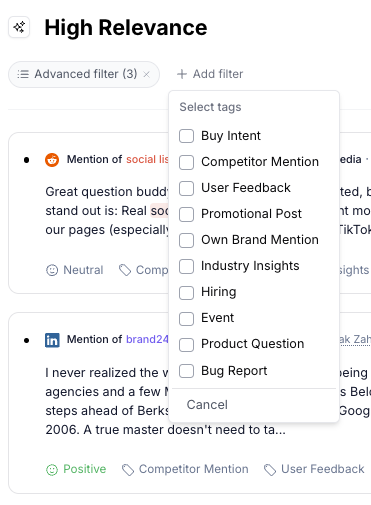 ## Filtering with tags
These tags allow you to filter your posts along with other filters including **Platform**, **Keyword**, **Language**, and **Sentiment**.
You can use tags to build powerful [feeds](/docs/quickstart/feeds). For example, a feed that only shows "Buy Intent" posts, or one that combines "Own Brand Mention" with negative [sentiment](/docs/learn/sentiment).
To improve the accuracy of AI tagging, make sure your [Company Context](/docs/quickstart/company-context) is filled in with a detailed description, use cases, and industry info.
## Filtering with tags
These tags allow you to filter your posts along with other filters including **Platform**, **Keyword**, **Language**, and **Sentiment**.
You can use tags to build powerful [feeds](/docs/quickstart/feeds). For example, a feed that only shows "Buy Intent" posts, or one that combines "Own Brand Mention" with negative [sentiment](/docs/learn/sentiment).
To improve the accuracy of AI tagging, make sure your [Company Context](/docs/quickstart/company-context) is filled in with a detailed description, use cases, and industry info.